
How I Connected Four Systems Into One to Run an 88-Member Coworking Space
When I opened Mesh Cowork in downtown Bakersfield in 2015, I thought I would buy some software, plug it in, and run the space. Six years in, Mesh had 88 active members, about $209,000 in annual revenue, and an operations system I had built myself because nothing off the shelf did the whole job.
Here is how that system came together, and what I would tell a small business owner stuck in the same place.
Four good tools that did not talk to each other
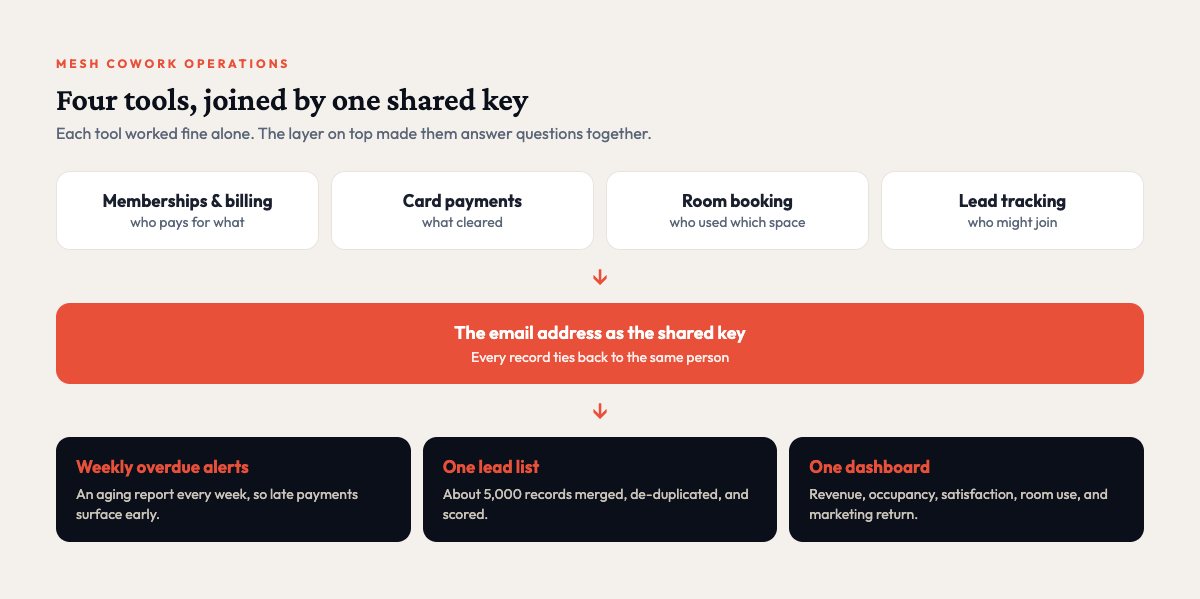
Like most small businesses, Mesh ran on a handful of tools. One handled memberships and billing, another processed card payments, a third booked meeting rooms, and a fourth tracked leads. Each one worked fine on its own. None of them shared anything with the others.
That made simple questions hard to answer. Who is behind on payments? How many leads became members this quarter? How full are we? Every answer meant logging into four dashboards, exporting spreadsheets, and matching rows by hand, and I was running the space alone. I did not have those hours.
I tried to make the membership platform do everything. It is good at what it does, but any report that crossed two systems hit a wall.
What I built
Piece by piece, I built a layer that sat on top of all four tools and joined them together.
One key to connect everything
The first decision was also the simplest. The email address became the shared key across every system, so a member in billing, a payment, a room booking, and a lead record could all be tied to the same person. Every connection I built after that was easier because of it.
Automatic overdue-payment alerts
The piece that paid off most was the least glamorous one. A set of scripts checked billing every week, flagged overdue accounts, and produced an aging report. I stopped finding out about late payments weeks after the fact. Because I caught declined cards early, those conversations got shorter and friendlier.
One lead list instead of five
Leads came in from website forms, events, partners, and old exports. I merged them into one list, removed duplicates, and scored each lead so I knew who to call first.
A dashboard for the whole business
Once the data was clean, I built dashboards for revenue, occupancy, member satisfaction, room use, and marketing return. One screen showed how the business was doing, and when something drifted I saw it the same day.
The decisions behind it
I never set out to build a system. I set out to answer one question at a time, and the answers added up.
I used scripts for the plumbing because they were quick to write and easy to change. When you are the only builder and the business is open every day, that speed matters. For the screens I used an off-the-shelf dashboard tool. Custom charts would have taken weeks, and I would rather have spent that time getting the data clean.
Every outside system had its own login method, limits, and quirks, so each connection needed error handling. A sync that fails at 2 a.m. can leave you with missing billing data in the morning.
What I learned
Start with the data before the features. Picking one shared key early saved me more time than any feature I built.
I also learned to automate whatever hurts most, even when it is boring. The payment alerts saved hours and money every month.
The data was messier than I expected. Every source had its own formatting, duplicates, and gaps, so budget time for cleanup. And because the business was live, I could never take the system offline for a rebuild. Every change had to be small, safe, and easy to undo.
What I would do differently today
I would put everything in one database from day one, with every connection writing to the same place. Reporting gets far simpler that way. For the simple connections I would use workflow tools instead of custom scripts, because a visual workflow is easier to hand to someone else.
And I would write it down as I went. When you are the only builder, documentation feels optional until the first time someone else needs to understand the system.
Years later I applied the same thinking to the Mesh website: keep the booking platform for what it does well, and build a fast, separate front end in front of it. You can read that story in the Mesh Cowork case study.
Field Notes from 521
One useful email a month.
Practical notes on automation, AI, and websites for small businesses, from real projects with real numbers. No spam, and you can unsubscribe anytime.
We use Mailchimp to send these emails. See our privacy policy.
If your tools don't talk to each other either
Most small businesses run on five to ten tools that do not share data, and someone on the team is quietly bridging the gaps with spreadsheets and copy and paste. Usually no single tool is the problem. The trouble is in the gaps between them. That gap is what I work on now. Plenty of businesses do not need a custom system. If someone on your team spends hours every week moving data from one tool to another, though, there is almost certainly a better way, and I am glad to look at it with you.