
Speed Is a Budget: Where Your Website's Load Time Goes
Most business owners know a slow website is bad. Fewer know where the slowness comes from. I rebuilt a site and then measured it, and the short version is that speed works like a budget. You spend some of it every time you add something to the page.
Why speed matters to a small business
Your website is usually the first thing a new customer sees, and most of them see it on a phone. If the page is still blank after a few seconds, many of them leave before they ever learn what you do. You never hear about those people. They just call someone else.
Speed also affects how Google treats you. Page experience, including how quickly the main content appears, is part of how Google judges a page.
The same business, two websites
When I rebuilt the website for Mesh Cowork, the old site stayed online on the booking platform. That left me with something you rarely get: the same business and the same content on two websites, which I could test side by side.
I measured both on the same day, on a simulated phone over a slow mobile connection, and took the middle of three runs.
| Old site | New site | |
|---|---|---|
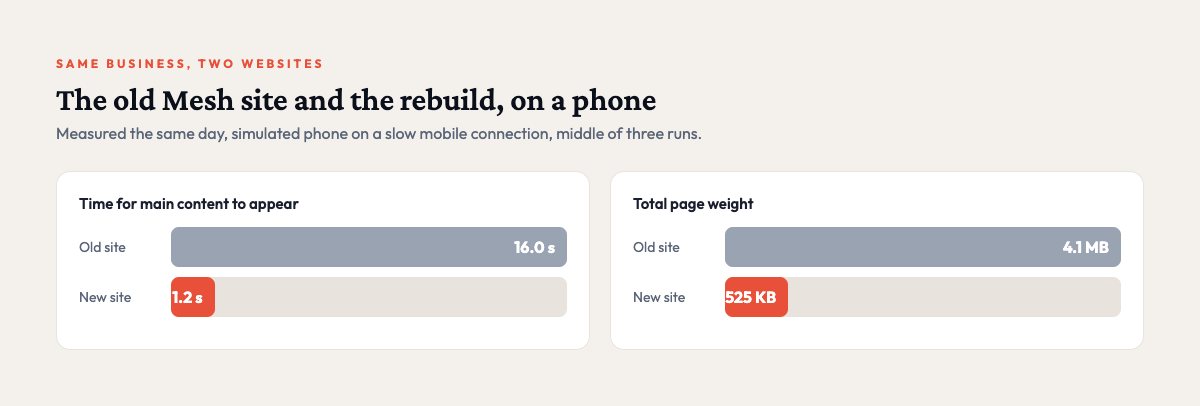
| Time for main content to appear | 16.0 seconds | 1.2 seconds |
| Total page weight | 4.1 MB | 525 KB |
| The site’s own code and images | 3.2 MB | 75 KB |
| Requests to load the page | 70 | 33 |
On the old site, a visitor on a phone waited about 16 seconds to see the main content. On the new one, it appears in about a second.
Where the time goes
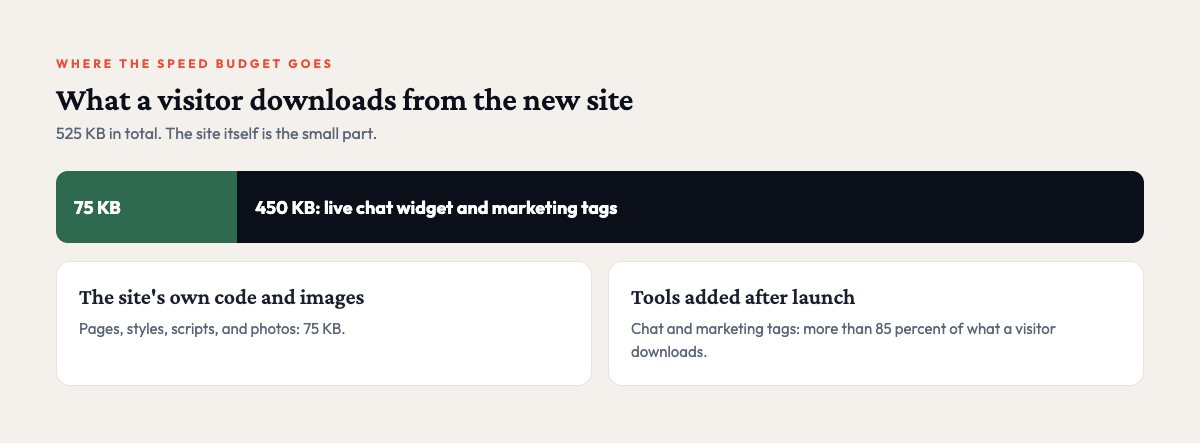
Compare the total page weight with the site’s own code and images. The new site’s own code and images weigh 75 KB, and the whole page weighs 525 KB. So where does the other 450 KB come from?
It comes from tools we added after launch, a live chat widget and marketing tags. Together they account for more than 85 percent of what a visitor downloads, and most of the page’s requests. Each was a reasonable business decision. Chat captures questions, and the tags tell us which pages produce inquiries. Every one of them still spends part of the speed budget.
I see the same pattern on almost every small business site I look at:
- Chat widgets that load more code than the entire rest of the site.
- Tracking and marketing tags that pile up, often for tools no one uses anymore.
- Uncompressed images straight from a phone or camera, which can weigh several megabytes each.
- Fonts and icon libraries loaded in full when the page uses a handful of characters. On one site I worked on, a 255 KB icon library was replaced with about 4 KB of icons the site used.
- Page builder themes that load every feature on every page, whether the page needs it or not.
How to spend your speed budget on purpose
Start by knowing your baseline. Run your homepage through Google’s free PageSpeed Insights tool on the mobile setting, and write down the score and the time for the largest content to appear. Without that number you have nothing to compare against later.
After that, make every addition earn its place. Before you add a widget, tag, or plugin, ask what it does for the business and what it costs in load time. If nobody can name the benefit, leave it out. Once a year, go through every tag and plugin on the site and remove the ones tied to tools you no longer use. That cleanup is often the fastest win available.
If you are going to fix one thing, fix images. Converting them to a modern format and sizing them correctly is usually the biggest single improvement. On the Mesh rebuild, the blog’s image library went from 115 MB to 3.9 MB with no visible loss in quality.
Finally, load the extras last. Chat and analytics can usually wait until the main content is on screen, so your visitor sees your headline before your chat bubble.
Field Notes from 521
One useful email a month.
Practical notes on automation, AI, and websites for small businesses, from real projects with real numbers. No spam, and you can unsubscribe anytime.
We use Mailchimp to send these emails. See our privacy policy.
Where to go from here
I care less about a perfect score than about deciding, on purpose, how many seconds your visitors spend waiting before they see what you offer. Check that number every time something new goes on the page. If you are not sure where your site’s load time goes, I can measure it and give you a ranked list of what to fix first.